


Performance Max asset groups are where you have the biggest say in what you advertise, how you sell it and who you want to reach. Budget and bidding are handled at campaign level, and Google takes care of where your ads show up. Your job is to give it the right assets to work with.
That's also why asset groups are where most accounts quietly go wrong. Some run one catch-all group with the bare minimum of creative and wonder why results are flat. Others split into ten groups on a handful of conversions a month, so most groups barely get any spend. This guide covers what an asset group is, what goes into it, how many you actually need, and how to tell whether each one earns its place.
What Is a Performance Max Asset Group?
An asset group is a bundle of creative and context that you hand to Google: headlines, descriptions, images, logos, videos, a landing page and, for retailers, product feed information. You can also add audience signals and search themes to guide Google's targeting. Google combines these assets to build ads for different placements across Search, Shopping, YouTube, Display, Discover, Gmail and Maps. PMax has no ad groups and no individual ads to write, so the asset group is the closest thing you get to both.
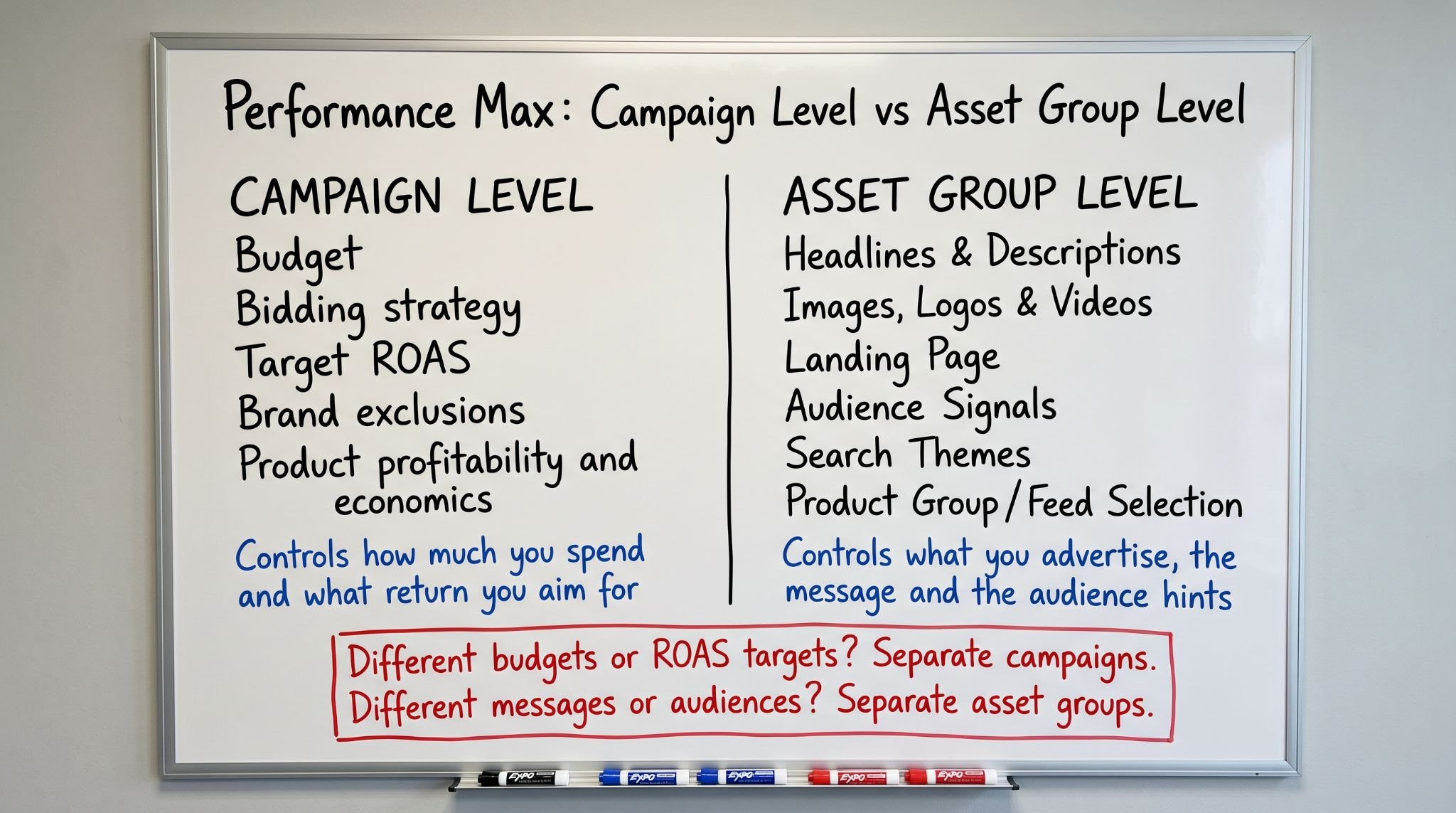
Everything that costs money sits at campaign level. Everything that shapes the message and gives Google hints about the audience sits at asset group level. If your hero product needs a 4x ROAS target and your accessories can live with 2x, no amount of clever asset groups will fix that. You need two campaigns.
The same goes for budget. Google can't give one asset group a bigger daily budget than another, so splitting by profitability is a campaign decision, not an asset group decision. It's a common first mistake: building five asset groups and expecting five different budgets.
You can add a horizontal logo (4:1) as an optional asset. Sitelinks are managed at campaign or account level rather than directly within the asset group. See Google asset specifications.
What Goes Into a Performance Max Asset Group
Google's minimum requirements are enough to launch an asset group, but they don't necessarily give you enough creative variety to cover all available inventory. Google recommends including every asset type and adding as many relevant assets as possible. The asset limits above show what you can provide; the right mix depends on your products, creative resources and campaign goals.
One piece sits outside the table: the final URL, the landing page the group sends traffic to. With Final URL expansion enabled, Google can replace your chosen URL with a more relevant page from your website based on the user's search intent. If Text customisation is also enabled, Google can generate headlines and descriptions to match that page. Check where your traffic actually lands instead of assuming it's always the page you chose.
Ad Strength: A Completeness Check, Not a Performance Score
Google rates each asset group from Incomplete to Excellent. Poor means you've given it just enough to launch, but that limits the inventory it can serve on. Average means you've covered the asset types needed to serve across available inventory, but there's still not enough creative variety. Good reflects stronger asset variety and text diversification. Excellent requires the full range of assets, including optional formats, at least six sitelinks, your own videos in all three orientations, and every headline (15) and description (5) slot filled.
Treat it as a checklist, not a sales forecast. Ad Strength tells you whether you've given Google enough creative material to work with. It doesn't tell you whether that creative will convert.
A group rated Poor can only serve across some available inventory. That's worth fixing before you start judging its results. You're not looking at the full potential of PMax if you've only supplied the minimum assets.
Video deserves special attention. If you don't upload your own, Google may generate one from the assets in your group. That means giving up some control over how your brand appears on YouTube and other video placements. If presentation matters to your brand, upload your own videos. Ideally, cover all three orientations: horizontal, square and vertical. They don't need to be expensive productions, but they should look like your brand.
“Ad Strength tells you whether the group is complete. It doesn't tell you whether it sells.”
Writing Assets Google Can Mix and Match
Google combines assets from the same group to build ads, so your headlines, descriptions and images need to work in different combinations. A headline could appear alongside a description you didn't originally pair it with. Say you sell ergonomic office chairs and one of your descriptions reads “It also comes with a warranty.” Paired with a headline about delivery, “It” points at nothing. Name the product in the description and it works next to any headline.
Variety only helps if the assets are genuinely different. Create asset variations to find the top performers, but if every headline for those chairs says “Free shipping on ergonomic chairs” in slightly different words, Google has nothing to test. Cover different angles instead: a benefit (what it fixes), an offer (shipping, returns), a proof point (reviews, warranty) and a common objection (will it fit my desk?). Do the same with images: the chair on white, in use at a desk, and a close-up of the detail that justifies the price.
One policy issue worth watching: a disapproved asset can limit the creative available to your campaign and affect delivery. If performance suddenly changes, check your asset status and Policy Manager before assuming it's a bidding or targeting problem. And if your Google Ads aren't showing, don't rule out policy issues.
Audience Signals and Search Themes: Hints, Not Targeting
Signals and search themes are the other thing you set per asset group, and they're the most misread part of PMax.
Audience signals tell Google what a likely buyer looks like: a customer list, past website visitors, a custom segment built from searches or competitor URLs. Search themes give Google extra context about search intent, using phrases like “ergonomic office chair for back pain”. You can add up to 50 search themes per asset group. They give Google additional context about the searches you want to reach, alongside the queries its systems already predict will perform well. They don't replace keywords or restrict delivery to the phrases you provide.
Neither one is strict targeting. Audience signals inform delivery without restricting it, so seeing people outside your list in the audience report is expected. When a search theme overlaps with a Search keyword, Google uses the same prioritisation rules as it does for other eligible keywords. An identical exact match keyword takes priority first. Identical phrase and broad match keywords, along with identical search themes, share the next priority level. If there is no identical match, Google uses AI-based prioritisation to decide which ad group or asset group is the best fit.
Where signals earn their place is in telling asset groups apart. A core group might lean on your customer list and category searches, while a conquesting group uses competitor brand names as search themes and competitor websites in custom segments. You're giving Google a stronger signal about the type of customer and search intent you want to attract, without restricting delivery to those audiences or searches.
The first mistake here though is treating signals as strict targeting and then panicking when delivery goes wider. The second is filling all 50 search themes with overlapping phrases. Add unique themes and skip near-duplicates such as “car” and “automobile”, since they reach the same audience.
How Many Asset Groups Do You Need?
A PMax campaign can hold up to 100 asset groups, but that doesn't mean you should use them all. The right number is as many as you have genuinely different products, audiences or messages, and no more. Separate groups when the content category, theme, language, landing page or target audience calls for different creative. If two product ranges share the same message and landing page, there's little reason to split them just for the sake of organisation.
More asset groups don't create more conversion data or give you more control over bidding. Every group still operates within the same campaign, sharing its budget and bidding strategy. There's no universal conversion threshold for deciding how many groups to create, so don't overcomplicate a low-volume campaign. Start with one full-build asset group per distinct product category or message, then add another only when you can explain exactly what makes it different.
And remember: if two product ranges need different ROAS targets or budgets, that's a campaign decision, not an asset group decision. You'll need separate campaigns.
How to Structure Asset Groups: A Real eCom Example
Sundays is a furniture brand with around 1,000 products. It started with a single catch-all PMax campaign, which made it hard to manage products with different order values and margins. We first split the campaigns into higher-value and lower-value products. Once the higher-value segment had enough conversion data, we gave each product category its own campaign. Inside each high-value campaign sat three asset groups: a feed-only group, a full-build group and a conquesting group.
Over the restructure, ad spend rose 40.71% and Google Ads revenue rose 37.19%. ROAS held stable at 3.48x against 3.57x before, and average order value climbed 54.27%, from CA$1,522.92 to CA$2,349.38.
That result came from the whole restructure, including a rebuilt feed with around 120 title rules, not from the asset groups alone. What the account does show is the pattern: campaigns are split where the economics differ, and asset groups are split where the message or audience differs.
Feed-Only vs. Full-Build Asset Groups
If you sell products and have a Merchant Center feed connected, you can build two kinds of asset group. A feed-only group has no headlines, images or videos. Google serves it primarily in Shopping placements, using your product data. To keep it feed-only, turn off Final URL expansion and text customisation (formerly automatically created assets) in the campaign's asset optimisation settings. A full-build group has the feed plus a full set of creative, so ads can show anywhere PMax runs: Search, YouTube, Display, Discover, Gmail and Maps.
Which one to use depends on intent and on what creative you actually have. Feed-only suits product-led shopping demand, where someone is already searching for a product and your product data does most of the work. It's also the practical choice when you launch before the creative is ready. A full-build group gives Google more ways to reach potential customers, using headlines, images and video alongside your product feed.
You don't have to pick one. You can run both inside the same campaign and compare their asset group performance in Google Ads. Just remember that a full-build group can also serve Shopping ads, so this isn't a clean split between Shopping and every other channel. If a feed-only group is already performing, don't change it without a reason. Test additional creative in a separate full-build group to see whether it improves results.
One thing asset groups won't do is separate brand from non-brand. When branded and non-branded traffic sit in the same PMax campaign, branded queries can account for a disproportionate share of conversions and revenue. This can make overall ROAS look healthy while hiding how much new-customer acquisition the campaign is actually delivering. If you want to measure prospecting separately, use campaign-level brand exclusions rather than creating a separate branded asset group.
How to Evaluate Asset Group Performance
Don't judge a PMax test too early. Give changes enough time to settle, and remember that new audience signals can take up to two weeks to fully integrate. For more formal tests, allow several weeks and factor in your conversion delay. There's no magic conversion threshold: the more limited your conversion volume, the more cautious you should be about drawing conclusions.
Use the asset group report to compare groups and the asset report to spot creative trends. Google now provides more granular reporting, including network segmentation, but asset-level metrics still need context. Individual assets can contribute to the same ad, so their numbers won't necessarily add up to campaign totals. Treat asset-level ROAS and CPA as directional indicators, not proof that one headline or image is responsible for the result. Where available, use Performance Max asset testing to measure the impact of adding or changing creative.
Two mistakes ruin most evaluations: editing too often and blaming creative for a delivery problem. If you swap headlines every few days, you never give a change enough time to prove itself. And if a new campaign is barely spending, the problem may be an overly aggressive tROAS target rather than the assets. Check your bidding settings before rewriting your headlines. If the target is too restrictive for the available conversion data, test lowering it by 10–20% before changing the creative.
The Bottom Line: Structure Decides What Performance Max Can Learn
Performance Max asset groups don't control your budget or bids. They shape the message, creative and audience signals Google starts with – the inputs you still have a say in. Good structure isn't about having more asset groups. It's about each group existing for a reason: a different product category, audience or marketing angle.
Aim for the recommended asset counts rather than the minimum. Keep brand and prospecting in separate campaigns. Put products with different economics in separate campaigns too. Then give your asset groups time to deliver meaningful results before changing them. Start with fewer groups than you think you need, and add another only when you can explain exactly what makes it different.