
.svg)
Why Your Google Ads Are Not Showing


If your Google Ads are not showing, the issue is usually more straightforward than people think. Your campaigns are either not eligible to enter the auction, too restricted to show properly, or simply not competitive enough to win impressions consistently.
The frustrating part is that Google Ads rarely explains this clearly. A campaign can be fully enabled and still barely show because of low budgets, aggressive bidding targets, broken tracking, poor Ad Rank, or targeting settings that are too narrow. In other cases, your ads may be approved, but Google still chooses not to show them often because competing advertisers are outperforming you in the auction.
This becomes even more common nowadays as automation and Smart Bidding play a bigger role in how ads are delivered. Google now relies heavily on conversion data and predicted performance when deciding who enters the auction and how aggressively campaigns spend their budget.
The good news is that most Google Ads delivery problems are fixable once you identify the actual bottleneck. In this article, we’ll break down the most common reasons why Google Ads are not showing and how to fix each one.
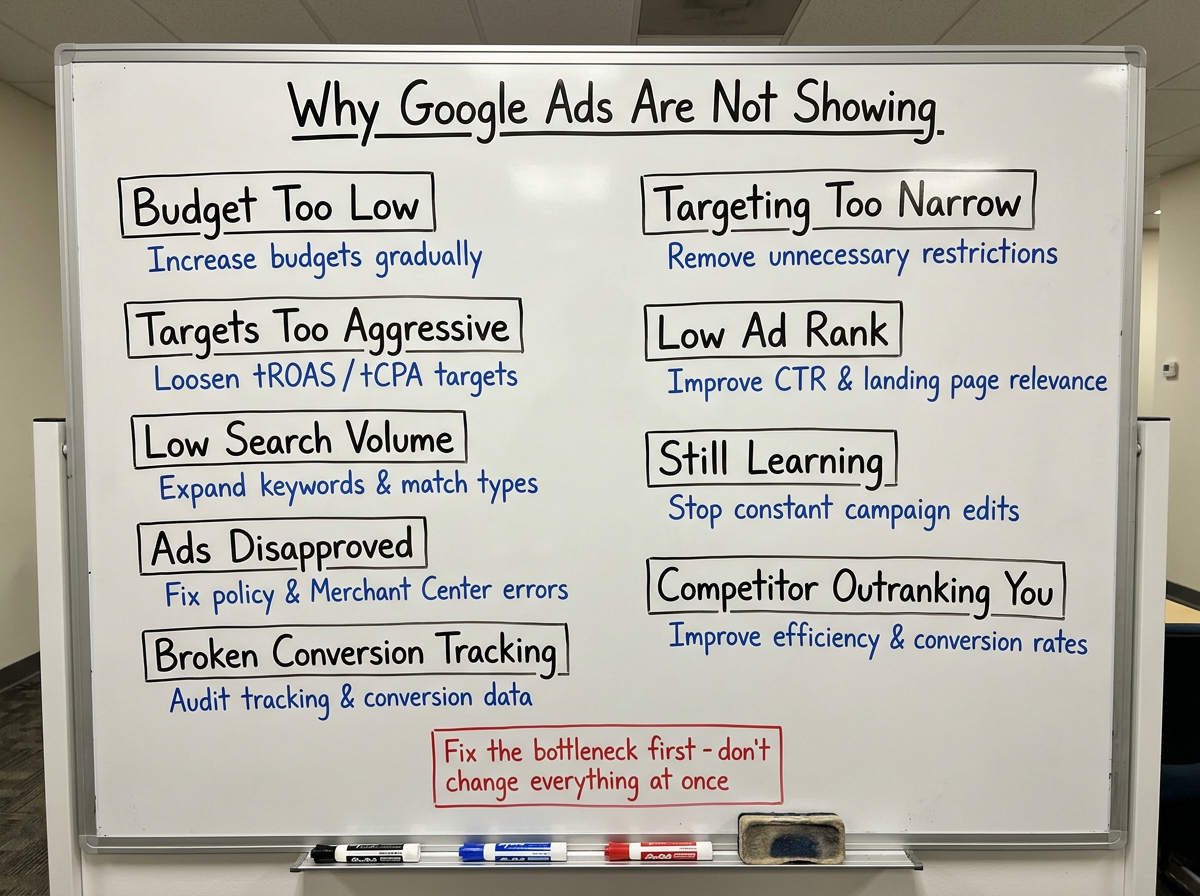
Most Common Reasons Why Your Google Ads Are Not Showing & How to Fix It
Your Budget Is Limiting Delivery
Your campaign may technically be active, but Google may restrict how often the campaign enters auctions if the daily budget is too small compared to the available traffic and competition. This is especially common in eCom accounts running Shopping, Search, or Performance Max campaigns in competitive categories. If average CPCs are high, a small daily budget gets exhausted quickly, which limits visibility throughout the day.
It also becomes a bigger issue when using Smart Bidding. Automated bidding strategies need enough conversion volume and spend to learn effectively. If the budget is too restrictive, campaigns struggle to gather enough data, which can lead to limited delivery, inconsistent impressions, or slower optimisation. You can usually spot this inside Google Ads through metrics like Search Lost IS (Budget), Shopping Lost IS (Budget), or a “limited by budget” campaign status. A campaign can be enabled while still participating in a limited number of auctions.
The Fix:
Increase budgets gradually based on realistic CPA or ROAS expectations instead of making aggressive jumps overnight. When increasing budget, focus on 20% increases every 3 to 5 days to avoid resetting the learning phase. As a rule of thumb, aim for enough spend to generate at least 1 to 2 conversions per day, which gives campaigns the data they need to learn and improve. Prioritise campaigns already showing strong conversion signals and avoid spreading budget too thin across too many campaigns at once.
Your Bids or Targets Are Too Aggressive
A lot of advertisers assume Smart Bidding automatically guarantees traffic. It doesn’t.
If your tROAS or tCPA are too aggressive, Google may intentionally limit delivery because the system doesn’t believe it can achieve your target efficiently enough. For example, setting a very high ROAS target on a new Performance Max campaign can severely restrict reach. The algorithm becomes overly selective about which auctions it enters, often resulting in very low impressions or almost no spend at all.
The same thing happens with unrealistically low CPA targets in Search campaigns. If Google predicts that a click is unlikely to hit your target profitably, the ad may simply not show. This is one of the biggest differences between manual bidding and automated bidding. Smart Bidding optimises for predicted conversion outcomes, not just visibility. The issue becomes even more common in newer accounts with limited conversion history. Without enough data, the system struggles to bid confidently. Poor or inconsistent conversion tracking can also reduce Smart Bidding efficiency, especially in automated campaign types like Performance Max.
The Fix:
Start with more realistic tROAS or tCPA targets and tighten campaign goals gradually over time. If campaigns are barely spending, your targets are often too restrictive for the amount of data available. Increase your tCPA or lower your tROAS by 10-20%. This "loosens" the algorithm and allows it to gather the data it needs to stabilise. If you are stuck at zero impressions, switch to a Maximise Conversions bidding strategy for two weeks to find your baseline CPA before setting a hard target.
Your Keywords Have Low Search Volume
Sometimes Google Ads are not showing because there simply isn’t enough search demand behind your keywords. This happens frequently in Search campaigns using very niche long-tail keywords or overly restrictive Exact Match targeting. While Exact Match gives more control, it can significantly limit reach if the keyword itself doesn’t generate enough searches.
Google may mark keywords as “Low Search Volume,” which means the platform temporarily makes them inactive until search demand increases again. While this doesn’t hurt your account, it prevents those keywords from entering the auction entirely until demand picks up.
This is especially common in:
- niche eCom categories (e.g., "hand-carved minimalist wallet"),
- highly specific product searches (e.g., "women’s waterproof trail running shoes size 37"),
- new product launches, where no one is searching for the specific product yet,
- smaller geographic markets,
- branded searches with limited demand.
The Fix:
Expand keyword coverage using Phrase Match or carefully tested Broad Match variations. Focus on search intent instead of overly specific keywords, and prioritise terms with enough volume to generate meaningful traffic and conversion data. Leverage Dynamic Search Ads (DSA) to let Google find relevant search terms by crawling your website content directly. This is one of the fastest ways to discover high-intent queries you might have missed in your keyword research.
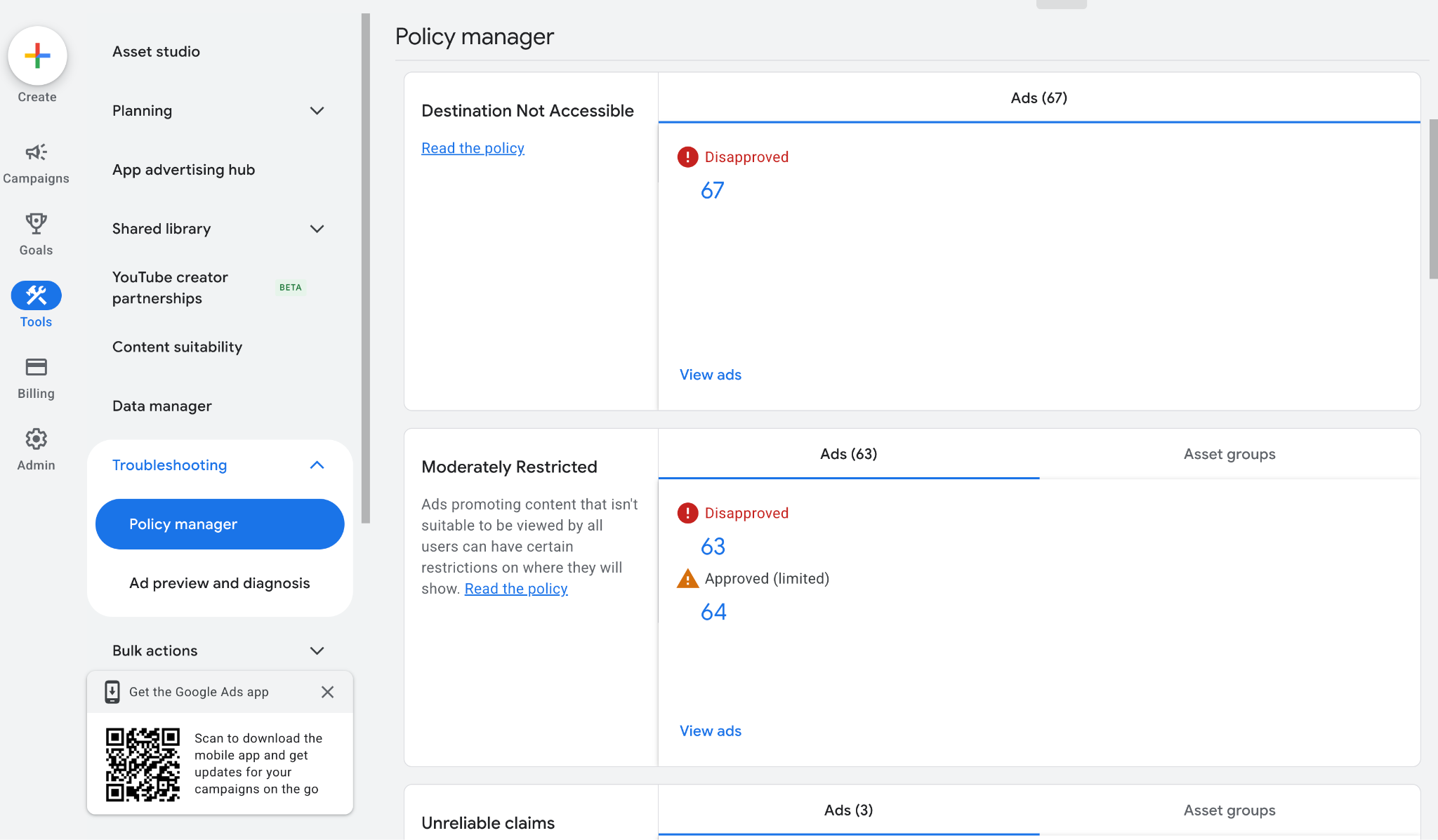
Use Google Ads Policy Manager to identify disapproved ads, policy violations, and delivery restrictions that may be preventing your campaigns from showing:
Merchant Center diagnostics help uncover feed problems like missing shipping information, invalid pricing, or product data errors that can stop Shopping ads from serving properly.
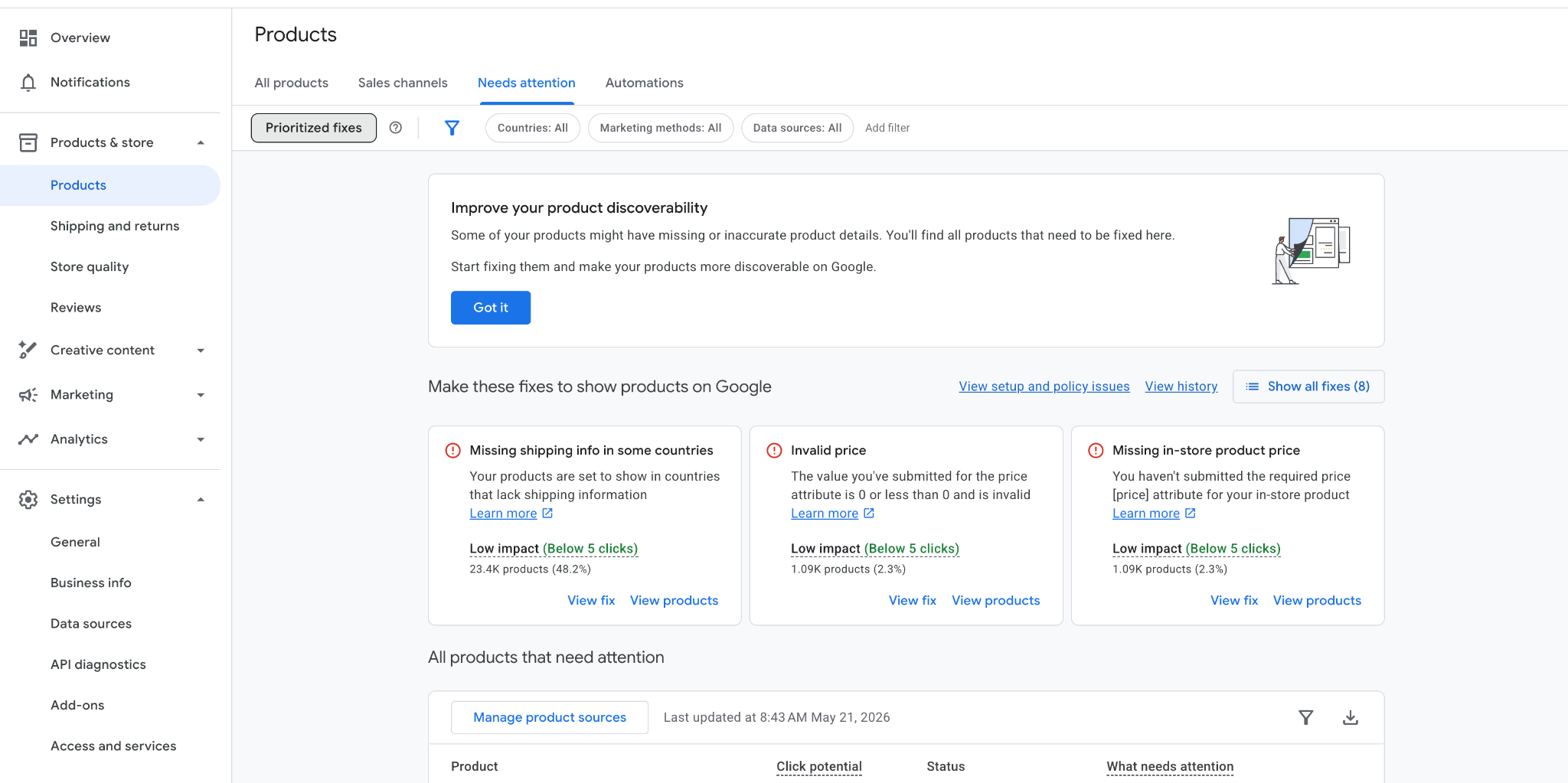
Note: When checking GMC “Product issues” make sure to uncheck “Prioritised fixes” as it’s pre-selected by default and hides most issues.
Your Ads Were Disapproved
Your Google Ads may not be showing because the ads themselves were disapproved.This can happen for a variety of reasons, including:
- Trademark violations: Using brand names in your ad copy that you don’t have permission for.
- Misleading claims: Promising results that sound too good to be true (common in supplements and beauty).
- Destination mismatches: Your ad points to a broken URL, or the final landing page domain doesn't match the URL displayed in your ad.
- Policy violations inside Merchant Center: If your product feed has issues (like incorrect pricing or shipping information), your Shopping and PMax ads will stop showing, even if the campaign status says "Active."
Sometimes the issue is more subtle. Ads can be marked as “Eligible (Limited),” meaning they only show in certain regions or for certain audiences. In Performance Max campaigns, if just one or two assets (like an image or a headline) are disapproved, it can drag down the performance of the entire asset group.
The Fix:
Check Policy Manager by going to Tools > Troubleshooting > Policy Manager to see a consolidated list of all violations. Review all policy and diagnostic alerts inside Google Ads and Merchant Center. Resolve disapproved products, assets, or destination issues as quickly as possible, since eligibility problems directly limit auction participation. If you believe you were wrongly flagged (which happens often with AI-driven moderation), don't hesitate to use the "Appeal" button.
Your Targeting Is Too Narrow
Individually, your targeting settings may look reasonable. But combined, they can create a targeting bottleneck that stops your ads from showing. This happens more often than most advertisers realise.
For example, combining a small geographic area with Exact Match keywords and a tight ad schedule might seem like "quality control", but in reality, you’ve created an audience so small that Google can’t find enough users to enter an auction.
Watch out for these specific settings:
- Location Intent: Many accounts target only "Presence" (people physically in your target location). While precise, it excludes potential customers who are actively searching for your service from outside that area. Switching to "Presence or Interest" can significantly expand your reach.
- Audience Exclusions: Over-filtering your campaigns by excluding too many audiences (especially in Performance Max) can quietly starve the algorithm of the data it needs to find new customers. If your ads aren't showing, try removing restrictive exclusions to let the system gather more meaningful signals.
The Fix:
Simplify your targeting to give the algorithm room to breathe, gather more signals, and find new opportunities. If impressions are low, try removing targeting layers. If you’re targeting a small city, don’t also restrict by age or gender unless it’s absolutely critical. Switch to a 24/7 schedule for a week. Let the data show you when customers are active instead of guessing and missing out on off-peak conversions. Expand your geographic reach or switch from Exact Match to Phrase Match to increase the pool of eligible auctions.
Your Ad Rank Is Too Low
Your ads may be approved and active, but if your Ad Rank is too weak, Google will simply not show your ads. Ad Rank is influenced by how much you bid, your expected CTR, how relevant your ad is, and how fast your landing page loads.
A common mistake is thinking that a higher bid solves everything. Google prioritises user experience above all else. If a competitor has a more relevant ad or a better website, they can outrank you while paying less per click than you do.
This becomes especially important in competitive eCom categories where multiple advertisers are bidding on similar products and search intent is highly transactional. Your status might say "Eligible," but in reality, you aren't even entering the auction.
The Fix:
Improve ad relevance before simply increasing bids. Focus on stronger messaging, better keyword alignment, higher CTR, and landing pages that closely match user intent. Better user experience often improves ad visibility more efficiently than aggressive bidding alone.
Your Campaign Is Still in the Learning Phase
Sometimes Google Ads are not showing consistently because the campaign is still learning. Whenever you launch a new campaign, adjust tROAS or tCPA, change bid strategies, or make other significant changes, Smart Bidding enters a learning phase. During this time, the algorithm is recalibrating its predictions and testing different auctions to see what works. This often results in unstable delivery or very low impressions for several days.
A lot of advertisers panic during this phase and start making even more changes, but that’s a mistake. If you see zero impressions and start making even more changes to "fix" it, you will reset the learning period all over again. This creates a cycle of permanent instability where the algorithm never has enough time to find a winning pattern. This is especially common in accounts with lower conversion volume, where the system needs more time to gather enough data to bid confidently.
The Fix:
Avoid making constant edits and changes during the learning phase. Give campaigns enough time and conversion volume to stabilise before evaluating performance or making major optimisation decisions. Focus on providing stable data and sufficient conversion volume, as the algorithm performs best when it is allowed to learn from consistent patterns rather than a constant stream of manual edits.
Your Competitors Are Outranking You
Google Ads is an auction, and you are constantly competing for space against other brands. Even if your settings are perfect, a stronger competitor can push you out of the top spots by having a better Ad Rank, higher bids, or more compelling creatives. This is especially common during high-stakes periods like Black Friday or in popular eCommerce categories where everyone is fighting for the same high-intent shoppers.
As more brands move toward automated Smart Bidding, the competition has become even more aggressive. Google now adjusts bids in real-time based on how likely a user is to buy. This means competitors with higher profit margins or more established conversion data can often afford to outbid you for the most valuable customers. If you notice your impressions dropping while your costs (CPCs) are rising, it’s a clear sign that the market is becoming more expensive and you are losing your share of the auction.
The Fix:
You shouldn't just try to win by spending more money, as this often leads to wasted budget and lower margins. Instead, focus on improving your overall efficiency by creating a cleaner account structure and better landing pages that convert at a higher rate. When your website converts better than your competitors', you can afford to bid more aggressively while remaining profitable, effectively forcing your way back into the top auction spots through better performance data.
“The "Incognito Test" is Useless
Stop searching for your own brand on Google to "see if the ad is there." This skews your data, lowers your CTR, and might even lead Google to stop showing you the ad because you never click it. Use the Ad Preview and Diagnosis Tool instead. It’s the only way to see the real auction status without damaging your account.”
How to Check Why Your Google Ads Are Not Showing
If your Google Ads are not showing, avoid making random changes inside the account before identifying the actual issue. Start by checking:
- campaign and approval status
- impression share metrics
- bidding targets and targeting settings
- conversion tracking and Auction Insights
One of the most useful tools is Google’s Ad Preview and Diagnosis Tool. It allows you to check whether your ads are eligible to show without affecting your impressions or CTR. You should also review your Search Lost IS (Budget) and Search Lost IS (Rank) columns, along with your campaign learning status and keyword search volume. In most cases, the problem becomes visible fairly quickly once you know where to look.
Final Takeaway: Google Ads Usually Stop Showing for Predictable Reasons
When your Google Ads are not showing, it’s usually due to a few common reasons. Campaigns typically stop showing because they lack enough budget, a strong enough Ad Rank, or realistic bidding conditions to compete effectively in the auction.
The mistake most advertisers make is trying to fix the problem by changing everything at once. But effective Google Ads optimisation is about identifying the specific bottleneck limiting delivery and fixing that one issue first. Once the account has enough data, a stable structure, and realistic targets, visibility typically improves naturally over time.

Ready To Start Scaling Today?
Scaling Your Favorite eCommerce Brands To The Highest Levels Through Google & YouTube Ads.

.svg)
Get Smarter About How To Scale Your Brand...
Discover Insider Knowledge On How We Scale Brands From 7 Figures All The Way Up To 8-9 Figures With Google Ads.
.svg)
.svg)
"The best Google ads agency there is. You only need to look at the quality of clients and the reviews to understand Jackson and his team are the real deal."

"One of the best in the agency space, great service and exceptional results. Since signing on with Jackson he has become one of our greatest assets when scaling."

"Top tier team & service delivery. Jackson is relentless when it comes to fulfilment & client needs. His attention to detail during the onboarding process ensured exponential results for my coaching business. If you're looking to elevate your ad results & learn a tone of new options/skills that can be implemented to drive more sales to your business then I'd strongly recommend Echelonn."

"From the very first conversation with Jackson and his team, it was clear that we had found a Google Ads agency that prioritises results above all else. Their collaboration between data-driven experts and a skilled copywriter creates a dynamic duo for Google advertising success..."

"Been working with them for 9 months and it's been a great experience. Jackson and his team know what they are doing and always goes above and beyond. If you're looking for a reliable Google ads agency this is the one."

"The best Google ads agency there is. You only need to look at the quality of clients and the reviews to understand Jackson and his team are the real deal."
"One of the best in the agency space, great service and exceptional results. Since signing on with Jackson he has become one of our greatest assets when scaling."
"Top tier team & service delivery. Jackson is relentless when it comes to fulfilment & client needs. His attention to detail during the onboarding process ensured exponential results for my coaching business. If you're looking to elevate your ad results & learn a tone of new options/skills that can be implemented to drive more sales to your business then I'd strongly recommend Echelonn."
"From the very first conversation with Jackson and his team, it was clear that we had found a Google Ads agency that prioritises results above all else. Their collaboration between data-driven experts and a skilled copywriter creates a dynamic duo for Google advertising success..."
"Been working with them for 9 months and it's been a great experience. Jackson and his team know what they are doing and always goes above and beyond. If you're looking for a reliable Google ads agency this is the one."
More Articles Like This.
Find answers to common queries about our services and how we can help you.
.svg)
Google Ads Optimization Score: Should You Trust It?
What Is a Good CTR for Google Ads?
Why More Google Ads Spend Doesn't Always Mean More Revenue
How To Rank Your Google Shopping Ads Multiple Times
Why Your Google Ads Scale Breaks After $X Per Day
How to Tell if Your Google Ads Agency Is Underperforming
Why Your Performance Max Campaign Gets Clicks but No Sales
.png)
Why Your Google Ads Budget Isn't Spending (And How to Fix It)

The Right Way to Run Google Dynamic Search Ads
How to Get New Customers With Google Ads in 2026
Why Your Google Ads CPA Keeps Increasing and How to Reduce It
What Is a Good ROAS for eCommerce Businesses?
How to Set Up Google Ads Conversion Tracking the Right Way
How Much Does a Google Ads Agency Cost?
Why Your Google Ads Are Not Converting
.png)
Average CPC in Google Ads by Industry (And What It Means for Your Strategy)
Performance Max vs. Shopping Campaigns: Which One is Better?

Why Your Google Shopping Ads Get Impressions But No Clicks (Image Optimization Guide)
Why Your Google Ads Are Not Showing

YouTube Ads Targeting Framework That's Driven $10M+ for eCommerce Brands

What Professional Google Shopping Ads Management Looks Like
How Much Do Google Ads Cost in 2026?

Should Your Business Use Google Search Ads or Performance Max?

Performance Max Best Practices for Sustainable Growth
.png)
Google Shopping Ads Audience Targeting: What Actually Impacts Performance
.png)
How to Write Google Search Ads That Actually Convert
.png)
6 Google Shopping Feed Best Practices That Drive Better ROAS
%20(1).png)
How to Get Your Products Recommended by AI (ChatGPT, Google AI & More)
.png)
Common Google Ads Myths That Cost Businesses Money
.png)
7 Benefits of Google Shopping Ads for Your eCommerce Business
.png)
How to Switch Google Ads Agency Without Losing Performance or Data
.png)
Demand Capture vs Demand Generation: Where Google Ads Fits
.png)
How to Prepare Your Business for Working With a Google Ads Agency

How to Avoid Wasting Budget on the Wrong Searches With Google Ads Keyword Match Types
Google Ads Account Ownership: What Businesses Should Know Before Hiring an Agency
.png)
Landing Page Optimization Strategies That Increase Conversions
SEO and Google Ads: How Search Engine Optimization and Paid Search Work Together
Types of Remarketing in Google Ads: How Each One Works and When to Use It
Google Ads Keyword Research: How to Find Keywords That Actually Convert
.png)
What Is Google Performance Max and How Does It Work?
.png)
How Advertorials Support High-Intent Google Ads Funnels
%20(Canva%20Template).png)
How Audience Targeting Works in Google Search Ads (and When to Use It)

Google Ads for New Brands: What to Know Before Spending Your First Dollar
.png)
What Is a PPC Agency – and When It Makes Sense to Hire One
.png)
How to Improve Your Google Ads Conversion Rate

.png)
The Right Way to Link Shopify and Google Ads for Scalable Growth
Google Shopping Campaigns Setup Guide 2025
Confessions of a Google Ads Auditor: The Worst Mistakes We See Inside eCom Accounts
How to Spy on Competitor Google Ads: Complete 2025 Guide
%20(2).png)
7 Questions to Ask Before Hiring a Google Ads Consultant
How to Rank #1 on Google Ads: Complete Shopping & Search Guide 2025
.png)
Learning Google Ads in 2025: The Roadmap Nobody Talks About
%20(1).png)
What Makes a Google Ads Specialist Worth $10,000/Month?

Why Cheap Google Ads Consulting Costs You $180,000+ in Lost Revenue
.png)
Why 99% of Google Ads Experts Fail (& How to Find One That Won’t)
.png)
5 Google Product Feed Fixes for eCom Growth
.png)
Google Ads Campaign Structure: Why 95% of Brands Waste Budget on Mixed Traffic

In-House vs Agency Google Ads: Which Delivers Better ROI in 2025?
.png)
How to Scale Google Ads With a Small Budget | Setup and Optimization

Google Shopping Optimization: 11 Proven Tactics for Maximum ROAS
%20(3).png)
eCom Growth Strategy: How We Scaled a Supplement Brand From $1.9M to $8.6M With Google Ads
%20(4).png)
Google Merchant Center Fix: How to Improve Rankings With Accurate Shipping Times

CTR Is Misunderstood by 95% of the PPC Industry (What to Optimise for Instead)
.png)
Google Ads AI | Manual vs Automated Campaign Performance

Complete YouTube Ads Guide 2025 | 3 Formats, 5 Principles, Proven Results
%20(2).png)
eCom Growth Strategy With Google Ads in 2025
.png)
Google Marketing Live 2025: 11 Key Takeaways for Marketers
%20(1).png)
YouTube Advertising Strategy: How to Drive Results Across Every Format
Google Shopping Feed Optimisation: Tips for Better Results

How Long Does it Take for Google Ads to Work?

YouTube Ads Analytics 101: Key Metrics and How to Use Them

Search Ad Strategies to Maximize Sales with Google ads for eCommerce (2024)

2025 Google Shopping Ads: Ultimate Guide, Benchmarks, and Pricing Breakdown

Maximizing ROI with Advanced Google Shopping Bid Strategies and Automated Bidding