
.svg)

Google knows a lot about how its own platform works. But it doesn't know your margins, your CPA ceiling, or how aggressively you can afford to grow this quarter.
That's the real issue with the Optimization Score sitting at the top of every Google Ads account. It looks like a report card. It isn't one. It's a checklist of actions Google estimates could improve your account, rather than a measure of your specific profitability targets.
Chasing that number and running a profitable account are two different jobs. Sometimes they line up. Often they don't, and knowing which situation you're in matters more than the percentage itself.
The Short Answer: Should You Trust Your Optimization Score?
Partly, and only for specific things. Optimization Score is a reasonable prompt to check your account for genuine oversights: a conversion action that quietly stopped tracking, an ad group with no approved ads left, a feed issue limiting Shopping visibility. For that kind of account hygiene, it's a useful trigger to go and look.
It is not a reliable signal of whether your account is profitable, and it was never built to be one. A campaign with a tight CPA target can have a lower Optimization Score, while a campaign spending aggressively on irrelevant broad match queries can have a higher one. The score can't tell the difference, because it isn't measuring profit. It's measuring how closely your account follows Google's own recommendations.
What Google Ads Optimization Score Actually Measures
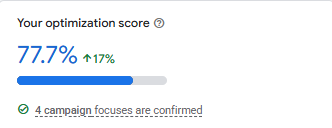
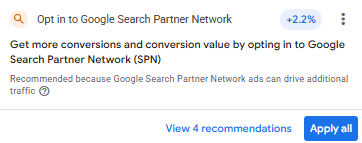
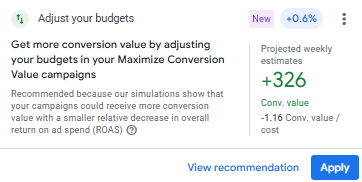
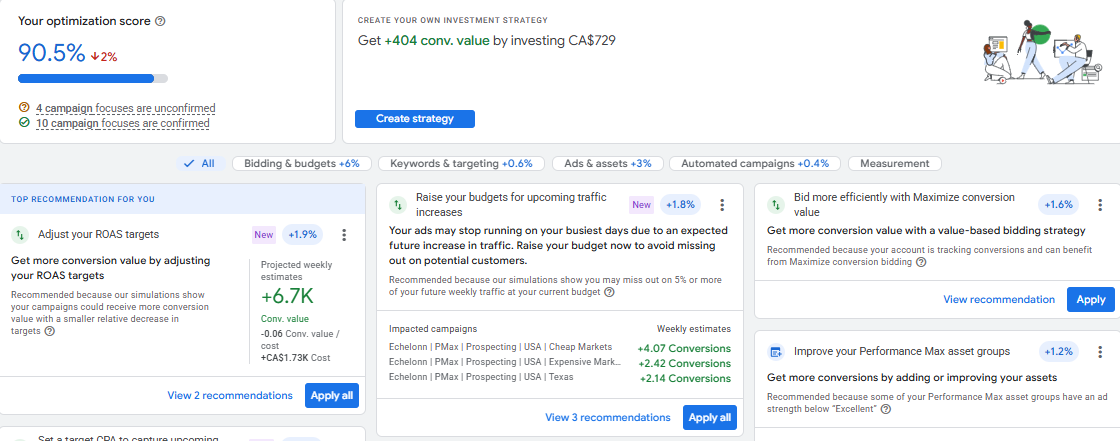
Optimization Score runs from 0 to 100%, calculated at both the account and campaign level. Every recommendation Google generates for your account comes with an estimated "score uplift" – how much your score would rise if you applied it. Apply enough recommendations, or dismiss the ones that don't fit, and the score can move toward 100%.
That last part surprises a lot of advertisers: dismissing a recommendation can increase your score too. You don't need to say yes to everything to reach a high number. You need to review each recommendation and decide whether it makes sense for your account.
Here’s what this looks like in practice: Google Ads shows an estimated score uplift for each recommendation, indicating how much your Optimization Score could increase if you apply it.

Optimization Score vs Quality Score
These two get confused often, and the confusion can lead to wrong decisions. Quality Score is a keyword-level diagnostic based on expected CTR, ad relevance and landing page experience. Optimization Score evaluates Google's recommendations for your account and estimates their potential impact. Neither one is a business performance metric. Quality Score helps you diagnose ad quality; Optimization Score helps you identify recommendations worth reviewing.
Why a 100% Optimization Score Doesn't Mean a Better Account
Many of the recommendations behind that score can push the account towards more reach, more budget or more automation. Broaden your match types. Raise your budget cap. Let Google auto-generate assets. Each one comes with a plausible-sounding uplift percentage.
None of those recommendations know what you're willing to pay for a customer. They don't know your margin, your current CPA target, or that you deliberately capped a campaign's budget because scaling it further last month dropped ROAS below your floor.
That's the gap. A recommendation can be technically accurate – for example, broad match probably will increase traffic – and still be the wrong call for an account managed against a specific profitability target.
“Google knows how its platform works. It doesn't know your margins, your CPA ceiling, or your strategic constraints.”
Which Google Ads Recommendations Should You Review Carefully?
Not every recommendation deserves the same level of scrutiny. Some genuinely fix something broken. Others shift how your budget gets spent without asking whether that's what you actually want.
Account and tracking fixes are usually worth applying quickly – they tend to repair something rather than reshape strategy. Bidding, budget, and targeting recommendations need a second look, because they're the ones most likely to move spend in a direction your account wasn't built for.
What This Looks Like in a Real Account
When we audited an eCommerce account, auto-apply recommendations were switched on as one of four structural issues limiting the account's growth, alongside an unreliable conversion tracking setup, a neglected Merchant Center, and no negative keyword infrastructure. As part of the initial cleanup in the first two weeks of the engagement, we switched auto-apply off, deployed shared negative keyword lists, and corrected location targeting to presence-only.
That's not a claim that auto-apply recommendations alone caused the account's earlier plateau, or that switching it off alone drove the growth that followed. It was one of several settings identified during the audit and addressed as part of a broader foundation-and-control phase before any scaling began. What it does show is why auto-apply settings belong in an account audit: they determine which changes Google can make without a manual review.
A Practical Framework for Testing Google Recommendations
These are testing guidelines we use internally, not rules set by Google. Treat them as a starting point for evaluating any recommendation that touches bidding, budget, or targeting.
- Wait at least two weeks, and let a campaign generate 15–30 conversions, before judging the impact of a major change
- Change one variable at a time – don't apply a bid strategy switch and a budget increase in the same week
- Cap budget increases at 20% at a time, with a 5–7 day gap before the next adjustment, to let Smart Bidding's learning phase stabilise
Google's own suggested uplift doesn't come with any of these constraints. It's an estimate based on the recommendation in isolation, not a schedule for how to test it safely against your account's actual data.
How to Use Optimization Score Without Letting It Run Your Account
Check the Recommendations tab on a set schedule. Treat it as an audit trigger: a prompt to look, not an instruction to act.
Go through each recommendation individually. Apply the ones that fix a genuine issue. Dismiss the ones that don't fit your account, and remember that dismissing can still move your score – you're not leaving points on the table by saying no.
Review your auto-apply settings carefully, and only enable recommendations where you're comfortable giving Google permission to make that kind of change without you reviewing it first. For most eCom accounts we work in, that's a shorter list than the default settings suggest.
Final Takeaway: Optimization Score Is a Checklist, Not a Scoreboard
Optimization Score has a place in how you manage a Google Ads account. It's a useful way to catch oversights you might otherwise miss, and a poor way to judge whether the account is actually performing.
The number in the top corner will keep climbing toward 100% whether your CPA is holding steady or creeping up every week. Profitability data will tell you which one is happening. The score won't. Use Optimization Score to find things worth investigating. Use your own performance data to decide what actually changes.