
.svg)
How to Set Up Google Ads Conversion Tracking the Right Way


Every dollar you spend on Google Ads is a decision based on data. The problem is that most advertisers don't realise how often that data is wrong.
When we audit Google Ads accounts, we regularly find duplicate conversions, missing conversion values, and tracking setups that are feeding Google inaccurate information. The campaigns might look profitable inside the platform, but the actual business results often tell a different story.
If your conversion tracking is broken, your ROAS becomes unreliable. Smart Bidding starts optimising towards the wrong signals. Scaling decisions become harder, and performance suffers as a result. The good news is that most tracking issues are completely avoidable. In this guide, we'll show you how to set up conversion tracking in Google Ads correctly, what you should be tracking, and how to make sure Google is learning from accurate data.
Why Conversion Tracking Matters More Than Most Advertisers Realise
Google Ads has changed significantly over the last few years. Smart Bidding now makes most optimisation decisions automatically. Instead of manually adjusting bids, advertisers are increasingly relying on Google's algorithms to find the right users and maximise performance.
Google can only optimise based on the data it receives. If your conversion tracking is inaccurate, Smart Bidding starts optimising towards the wrong signals. Instead of finding customers who are likely to buy, it can end up prioritising users who click but never convert.
The impact goes beyond bidding. If purchases are duplicated, conversion values are missing, or the wrong actions are being tracked, your reported ROAS becomes unreliable. At that point, you're making budget and scaling decisions based on inaccurate information, making it almost impossible to understand your true Google Ads costs and profitability.
We've audited and managed hundreds of Google Ads accounts over the years, and inaccurate conversion tracking remains one of the most common issues we encounter. In one eCommerce growth project, cleaning up attribution, connecting GA4 and Triple Whale, and implementing proper new customer tracking formed part of the foundation that helped scale a supplement brand from $1.9M to $8.6M in revenue within 60 days, while generating more than 6,100 purchases in a 30-day period. Accurate tracking wasn't the only reason for that growth, but it gave the account reliable conversion data that allowed scaling decisions to be made with confidence.
Before you worry about campaign structure or bidding strategies, make sure your tracking setup is giving Google accurate conversion data. Everything else depends on it.

What Should You Track in Google Ads?
One of the most common tracking mistakes is treating every user action as a conversion. If you tell the algorithm that an Add to Cart is as important as a completed purchase, don't be surprised when it starts finding users who add products to their carts but never buy.
Primary vs. Secondary Conversions
Primary conversions are the actions Google actively uses for Smart Bidding optimisation. Secondary conversions are tracked for reporting purposes only. Keep your Primary conversions limited to actions that directly impact revenue. Everything else belongs in Secondary. If you promote low-intent actions to Primary conversions, you risk training Google's algorithm to optimise for activity instead of actual business outcomes.
eCommerce Brands: Purchases First, Everything Else Second
For eCommerce brands, the primary conversion should almost always be a completed purchase. Actions like Add to Cart or Begin Checkout can be useful to monitor, but they shouldn't be the main optimisation goal.
Optimising towards purchases gives Google access to the strongest possible signal: actual revenue. This becomes particularly important when using Smart Bidding strategies in campaigns such as Performance Max and Shopping, where bidding decisions rely heavily on conversion quality and conversion value.
Lead Generation Brands: Qualified Leads, Not Form Submissions
For lead generation businesses, form submissions are only part of the picture. The real goal is generating qualified leads that turn into sales opportunities. Where possible, use offline conversion tracking to send CRM outcomes back into Google Ads and optimise towards lead quality rather than lead volume. This allows Google to learn which leads eventually become customers, rather than treating every form submission as equally valuable.
We've seen cases where front-end lead numbers looked healthy, but offline conversion data revealed that only a fraction of those leads became paying customers. Without importing CRM or offline conversion data, Google can optimise towards lead volume, but it has no reliable way to identify which leads ultimately become paying customers.
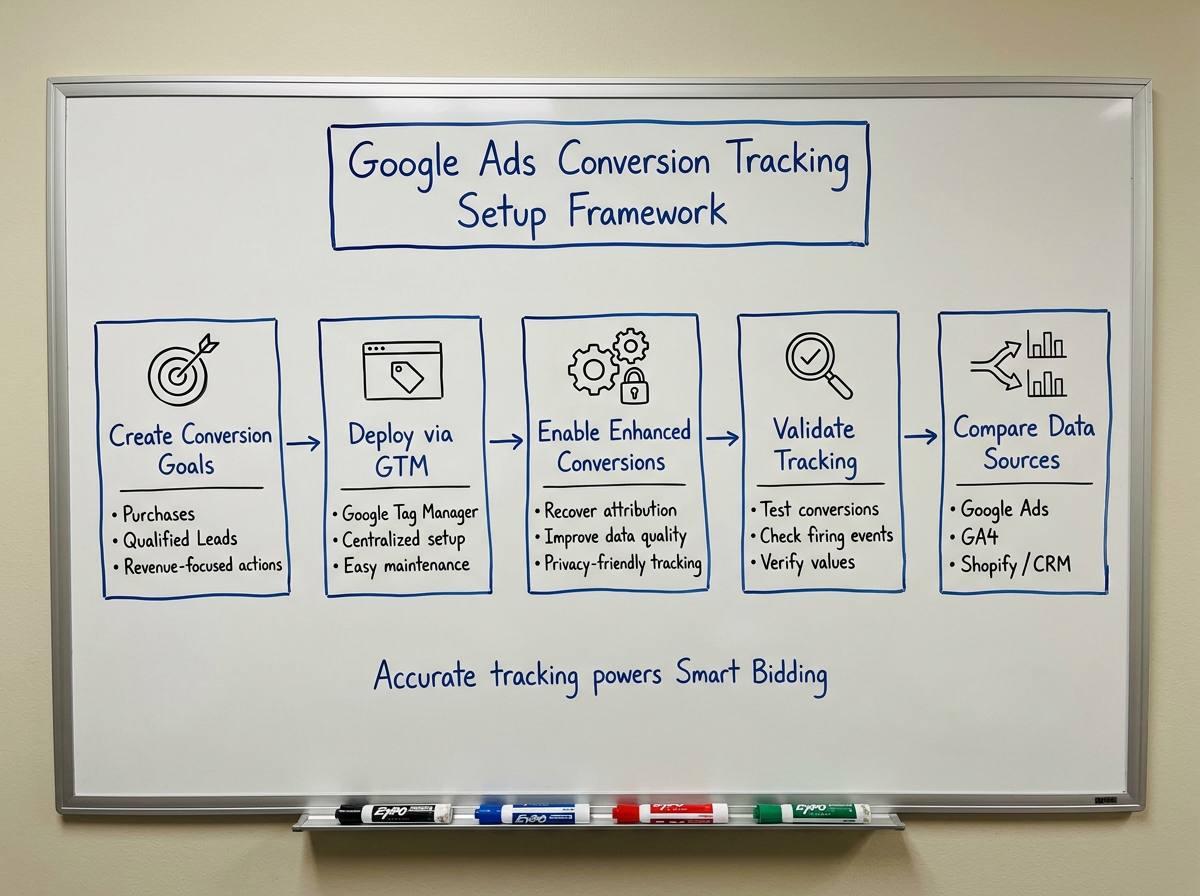
How to Set up Conversion Tracking in Google Ads Correctly (The GTM Framework)
For most businesses, Google Tag Manager is the simplest way to manage conversion tracking without relying on constant website development changes.
Step 1: Create the Right Conversion Goals
Inside Google Ads, navigate to Goals > Conversions > Summary and create the conversion goals that matter to your business. For most eCommerce brands, this will be Purchases. For lead generation businesses, it will typically be Qualified Leads or another revenue-driving action.
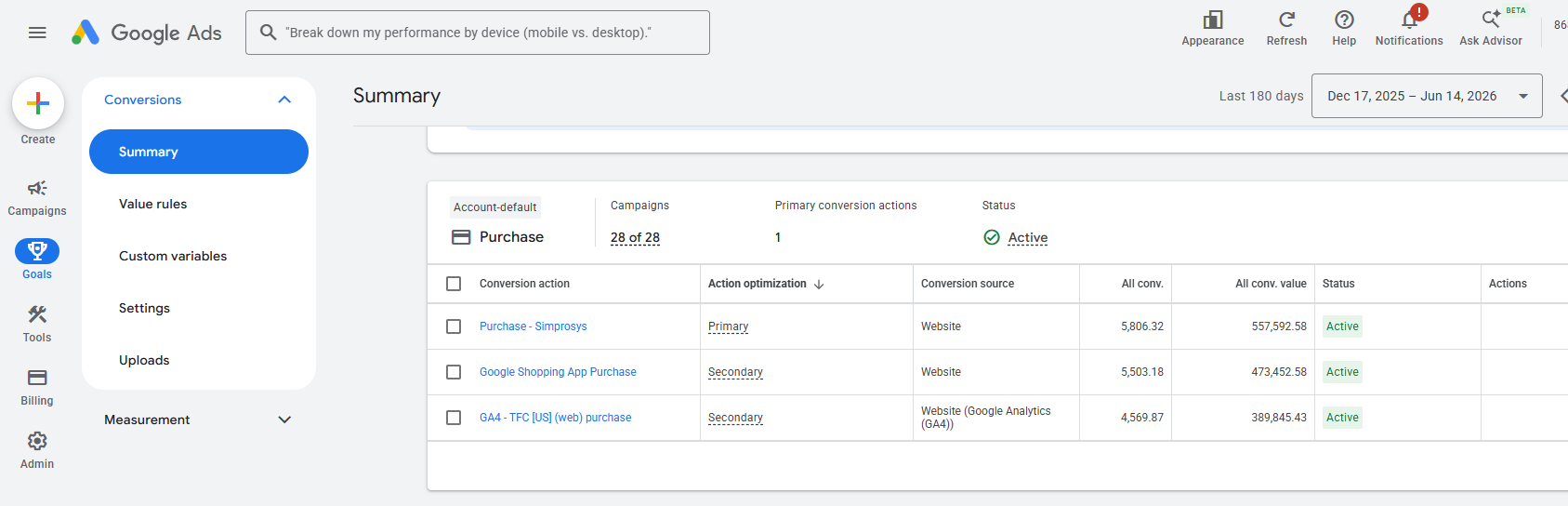
Step 2: Deploy Conversion Actions Through GTM
Once your conversion goals are configured, use Google Tag Manager to deploy the relevant conversion actions across your website. Managing tracking through GTM makes implementation, testing, and future updates significantly easier. Once the conversion action is created in Google Ads, deploy it through GTM and verify that it fires only when the desired action is completed. This is particularly important for purchase and lead tracking, where duplicate events can quickly inflate reported results and impact bidding performance.
Step 3: Enable Enhanced Conversions
Enhanced Conversions help Google recover attribution data that would otherwise be lost due to browser restrictions, privacy changes, and cookie limitations. They can also improve conversion measurement accuracy by giving Google more reliable first-party data signals. For most advertisers, this should be a standard part of any modern Google Ads tracking setup.
Step 4: Validate Your Tracking Setup
Before launching campaigns, test every conversion action to confirm it fires correctly and records the expected conversion data and values. Many tracking issues come down to simple implementation mistakes that go unnoticed for months.
Step 5: Compare Your Data Sources Before Spending
Once tracking is live, compare Google Ads data against Shopify, GA4, or your CRM. Small differences can occur because platforms don't always report conversions the same way.
For example, Google Ads typically attributes conversions back to the original ad click, while other platforms may report conversions based on the date the purchase actually occurred. This can be particularly noticeable when reviewing shorter date ranges, as some conversions may still fall within Google's 30- or 90-day attribution window and have not yet been fully reported. However, if the gap is large or changes suddenly, investigate for missing tags, duplicate tracking, or incorrect conversion setup.
How to Check if Your Conversion Tracking Is Accurate
Setting up conversion tracking is only half the job. The bigger challenge is making sure the data you're feeding into Google Ads is actually accurate. Here are four simple ways to validate your setup.
1. Run a Test Conversion
Before spending serious budget, complete a test purchase or submit a test lead through your website. Once the conversion has been recorded, verify that it appears in Google Ads under the correct conversion action and that the reported value matches the actual transaction.
2. Verify Conversion Values and Order Data
For eCommerce brands, accurate conversion values are just as important as conversion volume. A $50 order and a $500 order should never be reported the same way. Review a sample of recent transactions and confirm that Google Ads is receiving the correct purchase values, currency, and order data.
3. Monitor Reporting Trends
Conversion tracking rarely breaks overnight without warning. Unexpected spikes in conversions, sudden drops in ROAS, or performance trends that don't align with actual business results are often early indicators that something is wrong with your tracking setup. If the numbers in Google Ads stop reflecting what's happening in the business, investigate before making optimisation decisions. For example, a Conversion Repeat Rate above 1.1 for Purchase conversions is often worth investigating, as it can indicate duplicate conversion tracking or tags firing multiple times for the same transaction.
4. Use Tag Assistant and GTM Preview Mode
If you're unsure whether a tag is firing correctly, use Tag Assistant or GTM Preview Mode to test the conversion journey. A few minutes of testing can quickly reveal duplicate events, missing values, or implementation errors that would otherwise affect reporting accuracy.
“A common tracking issue happens when a customer refreshes the order confirmation page and the purchase event fires again. Google Ads records two purchases instead of one, inflating reported performance and potentially leading to bidding decisions based on inaccurate ROAS.”
Should You Use Google Ads Tracking, GA4, or Both?
This is one of the most common questions we get from clients. For most businesses, the answer is simple: use both, but don't treat them equally.
We generally recommend using native Google Ads conversion tracking as your Primary conversion source and GA4 as a secondary reporting and attribution tool. Google Ads needs reliable conversion data that is closely aligned with its bidding and attribution systems, which is why native conversion actions should usually be the signals driving Smart Bidding.
That doesn't make GA4 less important. GA4 provides a broader view of the customer journey and helps you understand how Google Ads works alongside channels like SEO, email marketing, and paid social. It's an excellent validation layer, but not the source we typically rely on for bidding decisions.
For most eCommerce and lead generation brands, the ideal setup is straightforward: use Google Ads conversion tracking as your Primary conversion and keep GA4 imported as a Secondary conversion for additional reporting and cross-channel analysis.
Final Takeaway: Feed the Machine Clean Data or Don’t Feed It at All
Google Ads has become incredibly good at finding customers. The catch is that it needs accurate conversion data to do it.
If purchases are being duplicated, values are missing, or the wrong actions are being tracked, the platform is optimising against flawed information. At that point, your reporting becomes less reliable and every optimisation decision becomes harder than it needs to be.
Before you blame your bidding strategy, Performance Max campaign, or product feed, make sure your tracking setup is doing its job. Because if the data is wrong, everything built on top of it will be too.

Ready To Start Scaling Today?
Scaling Your Favorite eCommerce Brands To The Highest Levels Through Google & YouTube Ads.

.svg)
Get Smarter About How To Scale Your Brand...
Discover Insider Knowledge On How We Scale Brands From 7 Figures All The Way Up To 8-9 Figures With Google Ads.
.svg)
.svg)
"The best Google ads agency there is. You only need to look at the quality of clients and the reviews to understand Jackson and his team are the real deal."

"One of the best in the agency space, great service and exceptional results. Since signing on with Jackson he has become one of our greatest assets when scaling."

"Top tier team & service delivery. Jackson is relentless when it comes to fulfilment & client needs. His attention to detail during the onboarding process ensured exponential results for my coaching business. If you're looking to elevate your ad results & learn a tone of new options/skills that can be implemented to drive more sales to your business then I'd strongly recommend Echelonn."

"From the very first conversation with Jackson and his team, it was clear that we had found a Google Ads agency that prioritises results above all else. Their collaboration between data-driven experts and a skilled copywriter creates a dynamic duo for Google advertising success..."

"Been working with them for 9 months and it's been a great experience. Jackson and his team know what they are doing and always goes above and beyond. If you're looking for a reliable Google ads agency this is the one."

"The best Google ads agency there is. You only need to look at the quality of clients and the reviews to understand Jackson and his team are the real deal."
"One of the best in the agency space, great service and exceptional results. Since signing on with Jackson he has become one of our greatest assets when scaling."
"Top tier team & service delivery. Jackson is relentless when it comes to fulfilment & client needs. His attention to detail during the onboarding process ensured exponential results for my coaching business. If you're looking to elevate your ad results & learn a tone of new options/skills that can be implemented to drive more sales to your business then I'd strongly recommend Echelonn."
"From the very first conversation with Jackson and his team, it was clear that we had found a Google Ads agency that prioritises results above all else. Their collaboration between data-driven experts and a skilled copywriter creates a dynamic duo for Google advertising success..."
"Been working with them for 9 months and it's been a great experience. Jackson and his team know what they are doing and always goes above and beyond. If you're looking for a reliable Google ads agency this is the one."
More Articles Like This.
Find answers to common queries about our services and how we can help you.
.svg)
How To Rank Your Google Shopping Ads Multiple Times
Why Your Google Ads Scale Breaks After $X Per Day
How to Tell if Your Google Ads Agency Is Underperforming
Why Your Performance Max Campaign Gets Clicks but No Sales
.png)
Why Your Google Ads Budget Isn't Spending (And How to Fix It)

The Right Way to Run Google Dynamic Search Ads
How to Get New Customers With Google Ads in 2026
Why Your Google Ads CPA Keeps Increasing and How to Reduce It
What Is a Good ROAS for eCommerce Businesses?
How to Set Up Google Ads Conversion Tracking the Right Way
How Much Does a Google Ads Agency Cost?
Why Your Google Ads Are Not Converting
.png)
Average CPC in Google Ads by Industry (And What It Means for Your Strategy)
Performance Max vs. Shopping Campaigns: Which One is Better?

Why Your Google Shopping Ads Get Impressions But No Clicks (Image Optimization Guide)
Why Your Google Ads Are Not Showing

YouTube Ads Targeting Framework That's Driven $10M+ for eCommerce Brands

What Professional Google Shopping Ads Management Looks Like
How Much Do Google Ads Cost in 2026?

Should Your Business Use Google Search Ads or Performance Max?

Performance Max Best Practices for Sustainable Growth
.png)
Google Shopping Ads Audience Targeting: What Actually Impacts Performance
.png)
How to Write Google Search Ads That Actually Convert
.png)
6 Google Shopping Feed Best Practices That Drive Better ROAS
%20(1).png)
How to Get Your Products Recommended by AI (ChatGPT, Google AI & More)
.png)
Common Google Ads Myths That Cost Businesses Money
.png)
7 Benefits of Google Shopping Ads for Your eCommerce Business
.png)
How to Switch Google Ads Agency Without Losing Performance or Data
.png)
Demand Capture vs Demand Generation: Where Google Ads Fits
.png)
How to Prepare Your Business for Working With a Google Ads Agency

How to Avoid Wasting Budget on the Wrong Searches With Google Ads Keyword Match Types
Google Ads Account Ownership: What Businesses Should Know Before Hiring an Agency
.png)
Landing Page Optimization Strategies That Increase Conversions
SEO and Google Ads: How Search Engine Optimization and Paid Search Work Together
Types of Remarketing in Google Ads: How Each One Works and When to Use It
Google Ads Keyword Research: How to Find Keywords That Actually Convert
.png)
What Is Google Performance Max and How Does It Work?
.png)
How Advertorials Support High-Intent Google Ads Funnels
%20(Canva%20Template).png)
How Audience Targeting Works in Google Search Ads (and When to Use It)

Google Ads for New Brands: What to Know Before Spending Your First Dollar
.png)
What Is a PPC Agency – and When It Makes Sense to Hire One
.png)
How to Improve Your Google Ads Conversion Rate

.png)
The Right Way to Link Shopify and Google Ads for Scalable Growth
Google Shopping Campaigns Setup Guide 2025
Confessions of a Google Ads Auditor: The Worst Mistakes We See Inside eCom Accounts

How to Spy on Competitor Google Ads: Complete 2025 Guide
%20(2).png)
7 Questions to Ask Before Hiring a Google Ads Consultant
How to Rank #1 on Google Ads: Complete Shopping & Search Guide 2025
.png)
Learning Google Ads in 2025: The Roadmap Nobody Talks About
%20(1).png)
What Makes a Google Ads Specialist Worth $10,000/Month?

Why Cheap Google Ads Consulting Costs You $180,000+ in Lost Revenue
.png)
Why 99% of Google Ads Experts Fail (& How to Find One That Won’t)
.png)
5 Google Product Feed Fixes for eCom Growth
.png)
Google Ads Campaign Structure: Why 95% of Brands Waste Budget on Mixed Traffic

In-House vs Agency Google Ads: Which Delivers Better ROI in 2025?
.png)
How to Scale Google Ads With a Small Budget | Setup and Optimization

Google Shopping Optimization: 11 Proven Tactics for Maximum ROAS
%20(3).png)
eCom Growth Strategy: How We Scaled a Supplement Brand From $1.9M to $8.6M With Google Ads
%20(4).png)
Google Merchant Center Fix: How to Improve Rankings With Accurate Shipping Times

CTR Is Misunderstood by 95% of the PPC Industry (What to Optimise for Instead)
.png)
Google Ads AI | Manual vs Automated Campaign Performance

Complete YouTube Ads Guide 2025 | 3 Formats, 5 Principles, Proven Results
%20(2).png)
eCom Growth Strategy With Google Ads in 2025
.png)
Google Marketing Live 2025: 11 Key Takeaways for Marketers
%20(1).png)
YouTube Advertising Strategy: How to Drive Results Across Every Format
Google Shopping Feed Optimisation: Tips for Better Results

How Long Does it Take for Google Ads to Work?

YouTube Ads Analytics 101: Key Metrics and How to Use Them

Search Ad Strategies to Maximize Sales with Google ads for eCommerce (2024)

2025 Google Shopping Ads: Ultimate Guide, Benchmarks, and Pricing Breakdown

Maximizing ROI with Advanced Google Shopping Bid Strategies and Automated Bidding